 Introduction
Get started
Basics
Sampler
Synthesizer
Mixer
Sample Store
Projects
Troubleshooting
AUv3
Credits
Synthesizer
Overview
Load the Synthesizer by clicking on FILE in the Main View Quick Menu (see Basics 7.1) , then tap SYNTH and select a synthesizer preset. To open the Synthesizer view, tap on the plot in the Main View (see Basics 8).
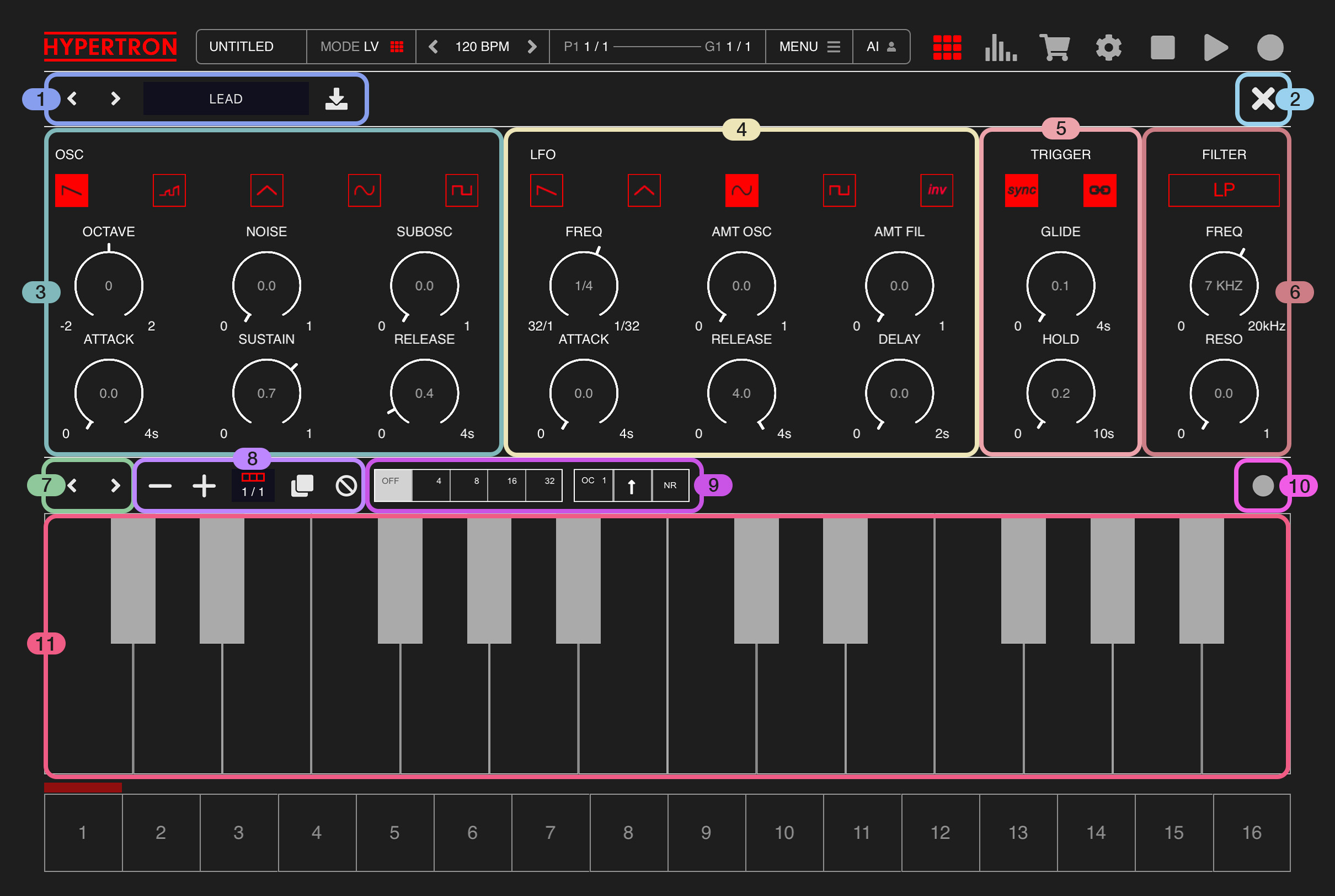
Each Pad can load a simple, yet effective monophonic synthesizer instance with two oscillators and one LFO, allowing pitch and filter modulation separately.
1Preset Browser
1

Browse through synthesizer presets using the arrows. The button next to the filename lets you save your current synthesizer settings as a synthesizer preset.
2Close
2

Tip this button to close the synthesizer view.
If you are running Hypertron on iPhone, there will be a KEYS button as well, which will open the Keyboard view.
3Oscillator
3
This section offers you control over the oscillator. An oscillator is a sinewave and the foundation of the sound.

This knob acts as a dry/wet parameter for a further sub-oscillator which is added one octave lower then the original one. Perfect for giving your signal a little bit more foundation.
3.1.OSC
There are five oscillator wavetables to choose from, defining the basic sound character:3.1.1.Sawtooth / Ramp wave
Produces a bright, buzzy sound with strong harmonics. Great for leads and brass-like sounds.3.1.2.Ramp / Upward sloping wave
Similar to sawtooth but may have a slightly different slope or partials emphasis. Often used for subtle tonal differences.3.1.3.Triangle wave
Smooth waveform with only odd harmonics, softer than sawtooth, good for pads and mellow tones.3.1.4.Sine wave
Pure tone with no harmonics, very smooth. Ideal for basses or sub frequencies.3.1.5.Square / Pulse wave
Rich harmonic content with a hollow character. Often used for leads, basses, and chiptune sounds.3.2.OCTAVE
This knob lets you control the octave of the oscillator. The range is 4 octaves wide.3.3.NOISE
This knob acts as a dry/wet parameter that adds white noise to your signal. At 0, there is no audible noise. At 0.5, the noise level is fully audible and at 1, the noise remains fully audible while the main oscillator sound disappears completely. This gives you a lot of flexibility, from adding just a bit of character to using only a high-frequency signal for rhythmic sounds.3.4.SUBOSC
(only available in PRO IAP)This knob acts as a dry/wet parameter for a further sub-oscillator which is added one octave lower then the original one. Perfect for giving your signal a little bit more foundation.
3.4.ATTACK
This knob controls the attack of the oscillator, the time it takes for the sound to rise from silence to full volume. It can be used to shape anything from sharp, percussive transients to slow, pad-like sounds.3.5.SUSTAIN
This knob controls the sustain level of the oscillator, the volume level that is held for as long as a note is active. Lower values create short, plucky sounds, while higher values maintain a steady, continuous tone.3.6.RELEASE
This knob controls the release time of the oscillator, the time it takes for the sound to fade out after a note is released. Short release times result in tight, abrupt endings, while longer release times create smooth, lingering tails.4LFO
4
This section offers you control over the LFO, which stands for Low Frequency Oscillator. These kind of oscillators are typically used to modulate the main oscillator by using filters. Hypertron has one LFO per synthesizer instance and lets you control two filters seperately.

If the SYNC parameter (see 5.1) is deactivated, the frequency can be freely set within a range of 0 to 20 kHz. If SYNC is activated, you can choose from the following tempo-synced values:
32/1 ( 32 Bars )
16/1 ( 16 Bars )
12/1 ( 12 Bars )
8/1 ( 8 Bars )
6/1 ( 6 Bars )
4/1 ( 4 Bars )
3/1 ( 3 Bars )
2/1 ( 2 Bars )
1/1 ( 1 Bar )
1/2.
1/2
1/2T
1/4.
1/4
1/4T
1/8.
1/8
1/8T
1/16.
1/16
1/16T
1/32.
1/32
1/32T
This knob controls the delay time of the LFO, the time between when a note is triggered and when the LFO modulation begins. Short delay times make the effect start almost immediately, while longer times allow the modulation to gradually kick in after the note starts. It basically acts as an offset parameter for the LFO.
4.1.OSC
There are five oscillator wavetables to choose from, defining how the filter is modulated over time.:4.1.1.Saw / Ramp wave
The modulation rises sharply and then drops suddenly (or vice versa), creating a ramping effect over the LFO cycle. Great for rhythmic sweeps or envelope-like modulation.4.1.2.Triangle wave
Smoothly rises and falls in a linear fashion, producing even, cyclical modulation. Ideal for gentle filter sweeps, vibrato, or tremolo.4.1.3.Sine wave
Smooth, curving modulation with no sharp edges. Perfect for natural-sounding oscillations like vibrato or slow filter sweeps.4.1.4.Square / Pulse wave
Modulation jumps instantly between two values, creating abrupt on/off changes. Useful for step-like effects, stuttered filters, or rhythmic gating.4.1.5.Invert
Toggles between the default and inverted LFO oscillator.4.2.FREQ
The frequency parameter controls the speed of the oscillator. It offers not only the common fast speeds found in most devices, but also very slow speeds ranging from 1 to 32 bars, which are ideal for slow build-ups over a longer period of time.If the SYNC parameter (see 5.1) is deactivated, the frequency can be freely set within a range of 0 to 20 kHz. If SYNC is activated, you can choose from the following tempo-synced values:
32/1 ( 32 Bars )
16/1 ( 16 Bars )
12/1 ( 12 Bars )
8/1 ( 8 Bars )
6/1 ( 6 Bars )
4/1 ( 4 Bars )
3/1 ( 3 Bars )
2/1 ( 2 Bars )
1/1 ( 1 Bar )
1/2.
1/2
1/2T
1/4.
1/4
1/4T
1/8.
1/8
1/8T
1/16.
1/16
1/16T
1/32.
1/32
1/32T
4.3.AMT OSC
Controls the amount of pitch modulation applied by the LFO, ranging from 0 to 1.4.4.AMT FIL
Controls the amount of filter modulation applied by the LFO, ranging from 0 to 1.4.5.ATTACK
This knob controls the attack of the LFO, the time it takes for the LFO to reach its full modulation depth after a note is triggered, in a range from 0 to 4 seconds. Short attack times create an immediate effect, while longer times allow the modulation to fade in gradually.4.6.RELEASE
This knob controls the release time of the LFO, the time it takes for the modulation to fade out after a note is released, in a range from 0 to 4 seconds. Short release times result in a quick drop-off of the effect, while longer release times allow the modulation to continue smoothly after the note ends.4.7.DELAY
(only available in PRO IAP)This knob controls the delay time of the LFO, the time between when a note is triggered and when the LFO modulation begins. Short delay times make the effect start almost immediately, while longer times allow the modulation to gradually kick in after the note starts. It basically acts as an offset parameter for the LFO.
5Modulation
5
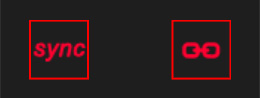
There are two buttons in this section, from left to right:
This knob controls the glide time, the time it takes for the pitch to slide smoothly from one note to the next. Short glide times create quick transitions, while longer times produce a smooth, legato pitch sweep between notes.
5.1.SYNC
Tap this button to toggle LFO sync between free-running modulation and BPM-synced modulation. See 4.25.2.TRIGGER
Tap this button to toggle the LFO trigger mode. When activated, the LFO is triggered on every note. When deactivated, the LFO triggers once per bar if the FREQ parameter is set to 1/1 or higher. If the FREQ is lower than 1/1, it triggers on the first bar of the corresponding LFO cycle.5.3.GLIDE
(only available in PRO IAP)This knob controls the glide time, the time it takes for the pitch to slide smoothly from one note to the next. Short glide times create quick transitions, while longer times produce a smooth, legato pitch sweep between notes.
5.4.HOLD
This knob defines the hold time of the oscillator, the duration the note is sustained before the release phase begins. It essentially acts as a release trigger event.6Filter
6
6.1.FILTER
Here you can select which filter should be controlled by the LFO. Just tap on it and toggle between: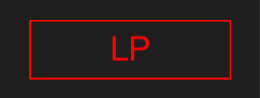
Lowpass LP
Acts as a lowpass filter. The FREQ parameter sets the cutoff frequency, ranging from 0 to 20 kHz. The RESO parameter controls the amount of resonance, emphasizing frequencies around the cutoff.
Bandpass BP
(only available in PRO IAP)
Acts as a bandpass filter. The FREQ parameter sets the center frequency, ranging from 0 to 20 kHz. The WIDTH parameter defines the width of the frequency band.
7Octave Control
7
Same as Sampler 5.
8Bar Control
8
Same as Sampler 6.
9Note Repeat & Arpeggiator
9
Same as Sampler 7.
10Record Button
10
Same as Sampler 8.
11Keyboard
11
Same as Sampler 9.